
Garage Job Card Format in Excel: 10 Easy Fields for Workshops
A clear garage job card format is the backbone of any workshop. It records what the customer reported, what you promised, which parts you used and what the customer owes. Without it, bills get disputed and repeat customers get lost.
In this guide, you will learn the 10 fields of a garage job card format in Excel, the formulas for balance and next service reminders, and tips that keep your workshop records clean. It works for two-wheeler garages and car workshops.
Table of Contents
- Why Your Garage Needs a Job Card Format
- Garage Job Card Format: 10 Fields
- How to Set Up the Job Card in Excel
- Excel Formulas for a Garage Job Card Format
- From Job Card to Final Bill
- Next Service Reminders
- Garage Job Card Format for Two-Wheelers and Cars
- Sample Garage Job Card Format
- Estimates and Customer Approval
- Parts Stock and Your Job Card
- Common Job Card Mistakes
- A Ready-Made Garage Management Kit
- Frequently Asked Questions
Why Your Garage Needs a Job Card Format
A job card is the first document created when a vehicle enters your workshop. A proper garage job card format protects both you and the customer.
- Clear agreement: the customer signs the complaints and the estimate.
- Proof of work: you can show which jobs and parts were done.
- Better billing: parts and labour flow straight into the final bill.
Garage Job Card Format: 10 Fields
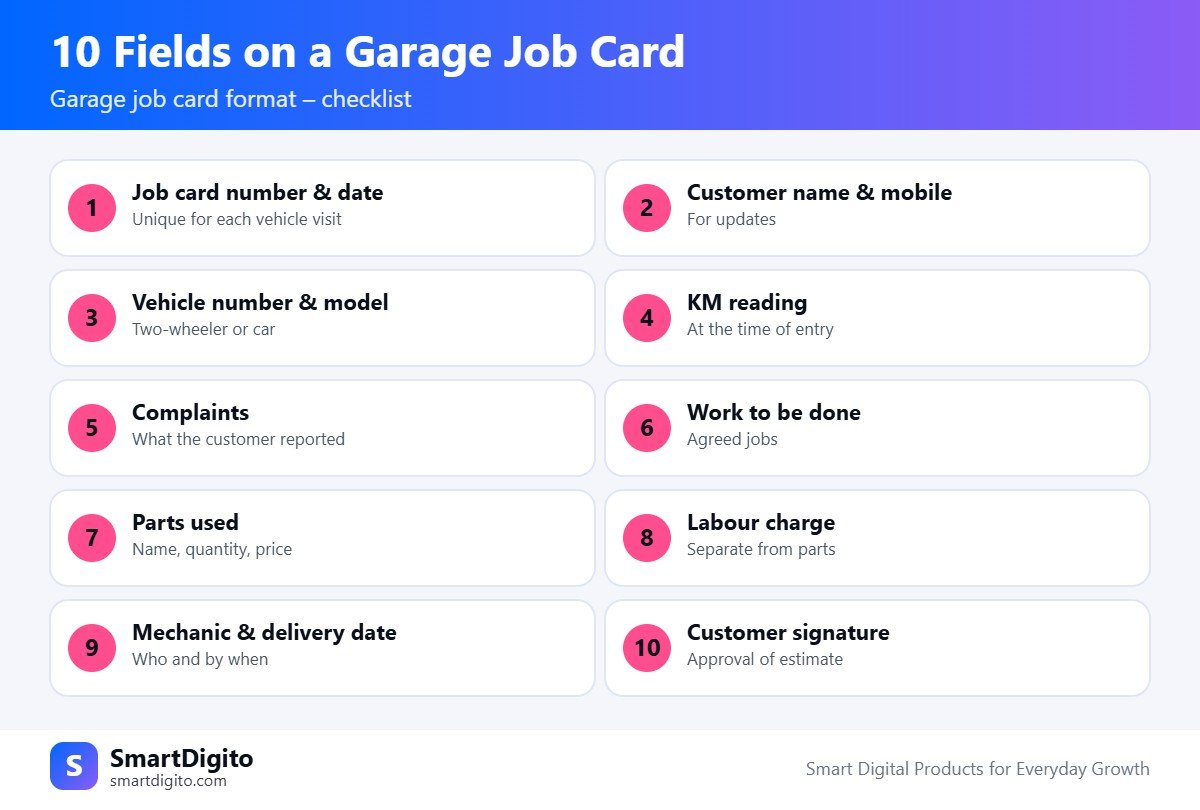
Every garage job card format should include these ten items.
- Job card number and date. A unique number for each visit.
- Customer name and mobile. For updates and reminders.
- Vehicle number and model. Two-wheeler or car, with make and year.
- KM reading. The odometer reading when the vehicle arrives.
- Complaints. What the customer reported, in their own words.
- Work to be done. The jobs you agreed to do.
- Parts used. Name, quantity and price.
- Labour charge. Keep it separate from parts.
- Mechanic and delivery date. Who works on it and when it is ready.
- Customer signature. Approval of the estimate.
How to Set Up the Job Card in Excel
Use separate sheets for vehicles, job cards and bill items. This keeps your garage job card format easy to search and print.
- Vehicles sheet: customer, mobile, vehicle number and model.
- Job cards sheet: job card number, date, KM, complaints, mechanic and status.
- Bill items sheet: job card number, item, type (part or labour), quantity and rate.
Add a status dropdown with values like Received, In Progress, Ready and Delivered.
Excel Formulas for a Garage Job Card Format
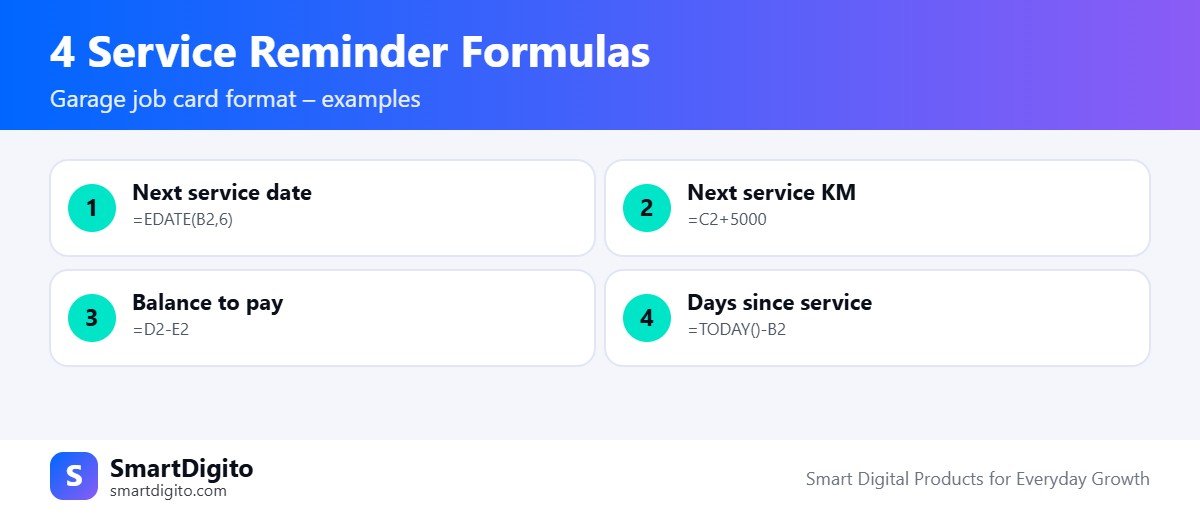
Assume the service date is in column B, the KM reading is in column C, the total bill is in column D and the amount paid is in column E.
Next service date, for example after 6 months:
=EDATE(B2,6)Next service KM, for example after 5,000 km:
=C2+5000Balance to pay:
=D2-E2Days since the last service:
=TODAY()-B2The 6 months and 5,000 km are only examples. Use the service interval that suits each vehicle. A garage job card format with these formulas needs very little manual work. See the Microsoft Excel help centre for more on these functions.
From Job Card to Final Bill
The best garage job card format flows straight into the bill. Parts and labour entered on the job card should total automatically. Add GST only if you are registered, and use the right rate for parts and for labour.
If you are new to GST bills, read our guide to how to create a GST invoice. Show the balance, the payment mode and a UPI QR on the final bill, so customers can pay with one scan.
Next Service Reminders
Repeat business is the strength of a garage. Record the next service date and KM on every job card. Filter the list every week and send a polite message to customers who are due.
A short WhatsApp reminder with the vehicle number, the service type and your contact is enough. Send it yourself, so it feels personal and your number stays safe.
Garage Job Card Format for Two-Wheelers and Cars
The garage job card format is the same in principle, but the checks differ.
- Two-wheelers: add fuel level, chain, brake and tyre condition.
- Cars: add AC, battery, brake pads, tyre tread and any warning lights.
- Both: note scratches and dents at entry, with the customer’s signature.
Sample Garage Job Card Format
This table shows how a garage job card format can look. The data is only an example.
| Job | Date | Vehicle | KM | Complaint | Parts | Labour | Status |
|---|---|---|---|---|---|---|---|
| J-001 | 02 Nov | MH12 AB 1234 | 18,200 | Brake noise | ₹900 | ₹300 | Ready |
| J-002 | 02 Nov | MH14 CD 5678 | 42,500 | Regular service | ₹2,400 | ₹800 | In Progress |
Common Job Card Mistakes
- Not noting the KM reading at entry.
- Writing vague complaints like “problem in engine”.
- Mixing parts and labour in one amount.
- Skipping the customer’s signature on the estimate.
- Not recording the next service date.
A Ready-Made Garage Management Kit
If you prefer a ready system, the Auto Garage Management Kit has a Garage Manager workbook with vehicles and customers, job cards, a one-click job card print, a bill with parts, labour, GST and a UPI QR, service reminders, vehicle history and a dashboard. It also includes a parts stock register, a mechanic salary sheet, forms, checklists and WhatsApp templates.
Estimates and Customer Approval
A good garage job card format includes an estimate before work starts. Check the vehicle, list the likely jobs and parts, and tell the customer the expected cost and time.
If you find extra work during the job, call the customer and record the approval on the job card, with the date and time. This habit prevents most billing arguments.
- Write the estimate as parts plus labour.
- Note the customer’s approval for any extra work.
- Record the final bill next to the original estimate.
Parts Stock and Your Job Card
Parts are the biggest cost in a workshop. Link each garage job card format entry to a simple parts stock sheet, with opening stock, parts in, parts used and balance.
Set a minimum quantity for fast-moving parts like oil, filters and brake pads. When the balance falls below it, flag the item for reorder. A simple stock check each week stops last-minute shortages and keeps repairs on time.
Frequently Asked Questions
What should a garage job card contain?
It should contain the job card number, customer, vehicle, KM reading, complaints, work to be done, parts, labour, mechanic, delivery date and signature.
Can I make a garage job card in Excel?
Yes. Excel can store job cards, total the bill and print a clean card for each vehicle.
How do I remind customers about the next service?
Record the next service date and KM on every job card, then filter the list weekly and message the customers who are due.
Should the job card be signed by the customer?
Yes. A signature on the estimate avoids disputes about the work and the price.
Final Thoughts
A good garage job card format is simple: clear complaints, separate parts and labour, and a signature. Set it up once, use it for every vehicle, and your workshop will feel more professional.
Note: This guide is general information. Check GST rules and service intervals for your own business.