
Gym Membership Register Format: 10 Fields Every Gym Needs (Easy Guide)
A good gym membership register format helps you track who joined, when the plan ends and who still owes money. Without it, renewals are missed, dues pile up and members drift away without anyone noticing.
In this guide, you will learn the 10 fields of a gym membership register format, the Excel formulas for expiry and dues, and simple habits that help you keep your members. It suits gyms, Zumba and yoga classes and fitness studios.
Table of Contents
- Why You Need a Gym Membership Register Format
- Gym Membership Register Format: 10 Fields
- How to Set Up the Register in Excel
- Excel Formulas for a Gym Membership Register Format
- Renewals and Expiry Alerts
- Pending Dues and Follow-Up
- Keep Members With a Simple Routine
- Sample Gym Membership Register Format
- Gym Membership Register Format for Different Plans
- Monthly Reports From Your Register
- Common Register Mistakes
- A Ready-Made Gym Management Kit
- Frequently Asked Questions
Why You Need a Gym Membership Register Format
A paper diary is easy to lose and hard to search. A digital gym membership register format keeps every member in one file, with the same columns for everyone.
- No missed renewals: you see expiry dates before they pass.
- Clear dues: the balance of every member is calculated automatically.
- Better planning: you know how many members are active this month.
Gym Membership Register Format: 10 Fields
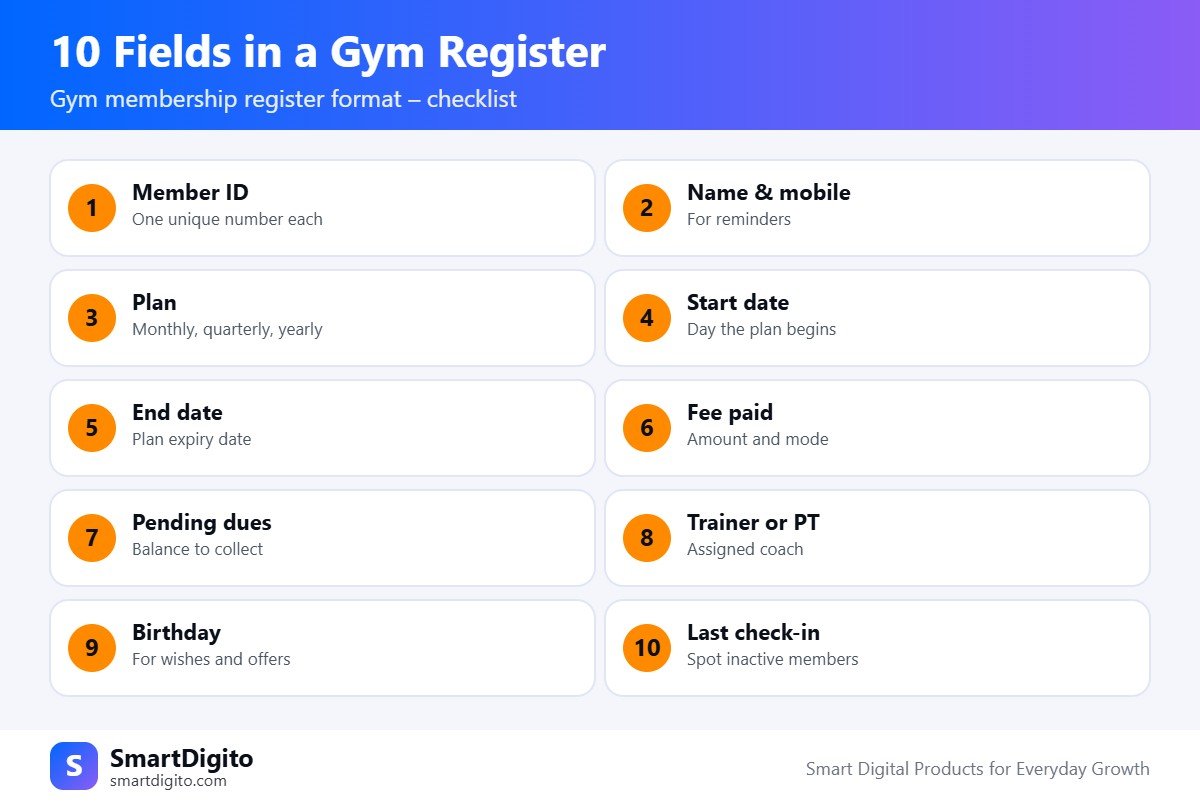
Every gym membership register format should have these ten columns.
- Member ID. A unique number for each member.
- Name and mobile. You need it for reminders.
- Plan. Monthly, quarterly, half-yearly or yearly.
- Start date. The day the plan begins.
- End date. The day the plan expires.
- Fee paid. Amount and payment mode.
- Pending dues. The balance still to be collected.
- Trainer or PT. Who is assigned to the member.
- Birthday. Useful for wishes and offers.
- Last check-in. Helps you spot members who stopped coming.
How to Set Up the Register in Excel
Use one sheet for members and one sheet for payments. This keeps your gym membership register format clean, even when a member pays in two instalments.
- Members sheet: ID, name, mobile, plan, start date, end date, trainer and birthday.
- Payments sheet: date, member ID, amount, mode and receipt number.
- Dropdowns: use data validation for plan names and payment modes.
Excel Formulas for a Gym Membership Register Format
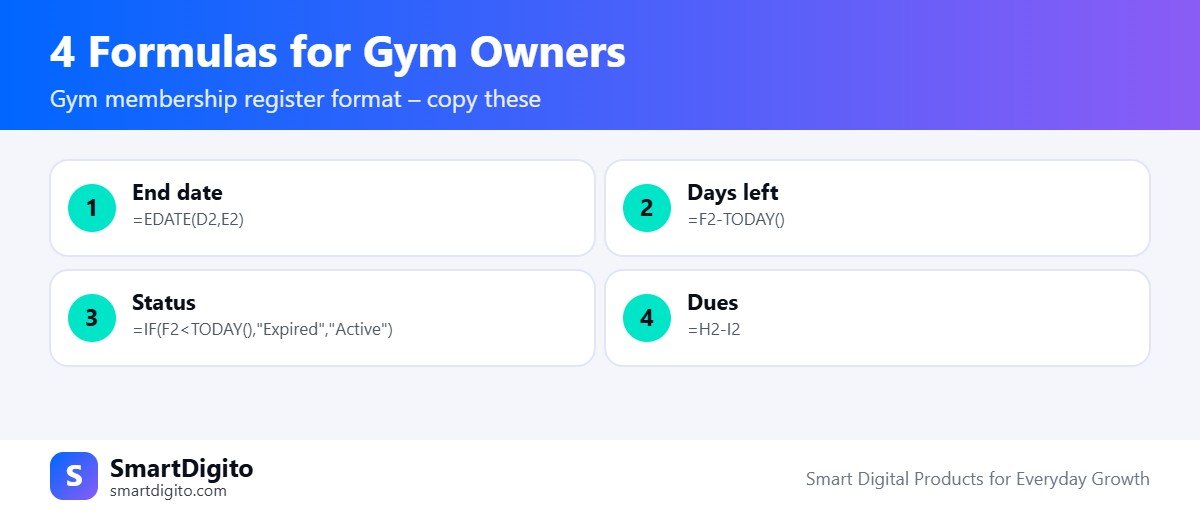
Assume the start date is in column D, the plan length in months is in column E, and the end date is in column F.
End date from the start date and plan length:
=EDATE(D2,E2)Days left in the plan:
=F2-TODAY()Active or expired status:
=IF(F2<TODAY(),"Expired","Active")Pending dues, where plan fee is in column H and the amount paid is in column I:
=H2-I2With these four formulas, your gym membership register format updates itself every day. You can learn more about each function in the Microsoft Excel help centre.
Renewals and Expiry Alerts
Renewals are the heartbeat of a gym. Add a column that shows “Renew in 7 days” when the days left are 7 or fewer. Filter this column every morning and call those members.
A short personal message works better than a long one. Mention the member name, the plan end date and a simple way to pay. A good gym membership register format makes this daily task take five minutes.
Pending Dues and Follow-Up
Keep a separate view of members with dues above zero. Sort it by amount or by date. Contact the largest and oldest dues first.
Record each follow-up in a notes column, with the date and the promised payment day. This history avoids repeated awkward calls.
Keep Members With a Simple Routine
A gym membership register format is more than a record. It is a tool to keep members engaged.
- Birthdays: send a short wish on the member’s birthday.
- Inactive members: if the last check-in is more than seven days old, send a friendly check-in message.
- New members: call them after the first week to ask how it is going.
- Trainer follow-up: ask trainers to update progress notes monthly.
Results vary by gym, but members who feel noticed often stay longer.
Sample Gym Membership Register Format
This table shows how a gym membership register format can look. The names and amounts are only examples.
| ID | Member | Plan | Start | End | Fee | Paid | Dues | Status |
|---|---|---|---|---|---|---|---|---|
| G-001 | Rahul S. | Quarterly | 01 Oct | 01 Jan | ₹4,500 | ₹4,500 | ₹0 | Active |
| G-002 | Neha P. | Monthly | 05 Oct | 05 Nov | ₹1,800 | ₹1,000 | ₹800 | Active |
| G-003 | Amit K. | Yearly | 10 Jan | 10 Jan | ₹12,000 | ₹12,000 | ₹0 | Active |
Common Register Mistakes
- Not recording the end date, so renewals depend on memory.
- Mixing the fee and the amount paid in one column.
- Skipping the mobile number.
- Not updating the register on the same day.
- Keeping the file on one phone without a backup.
A Ready-Made Gym Management Kit
If you want to skip the setup, the Gym and Fitness Centre Management Kit has a Gym Manager workbook with members, bills, renewals, pending dues, birthdays, inactive members and a dashboard. It also includes a trainer salary sheet, a member progress tracker, workout and diet plans, forms and WhatsApp templates. It suits gyms, Zumba and yoga classes.
For a similar approach to fees, see our guide to the fee receipt format in Excel.
Gym Membership Register Format for Different Plans
Not every member buys the same plan, so your gym membership register format should handle the common options.
- Monthly, quarterly and yearly plans: use one plan column and one months column, so the end date is calculated by formula.
- Plan freeze: add a column for freeze days and add them to the end date.
- Personal training: add a column for PT sessions bought and sessions left.
- Couple or family plans: give each person a member ID and link them with a family code.
Keep the plan names in a small list on another sheet. A dropdown then prevents spelling mistakes, and your gym membership register format stays reliable.
Monthly Reports From Your Gym Membership Register Format
At the end of each month, your register should answer a few simple questions. Use filters and the COUNTIFS and SUMIFS functions.
- How many new members joined this month?
- How many plans expired, and how many were renewed?
- How much fee was collected, and in which mode?
- How much is still pending, and from whom?
Write the answers in a small summary table. Compare each month with the last one. Over a few months, you will see a pattern in your joins and renewals.
Frequently Asked Questions
What should a gym membership register include?
It should include member ID, name, mobile, plan, start and end dates, fee paid, dues, trainer, birthday and last check-in.
How do I calculate the gym plan end date in Excel?
Use the EDATE function with the start date and the plan length in months.
How can I find members whose plan is about to end?
Calculate the days left with the end date minus today, then filter for 7 or fewer days.
Can I use the same format for a Zumba or yoga class?
Yes. Replace the trainer column with the batch or time slot, and keep the other fields the same.
Final Thoughts
A simple gym membership register format, updated daily, protects your income and your members. Start with the 10 fields, add the four formulas, and check renewals and dues every morning.
Note: This guide is general information. Results depend on your gym, your members and your effort.