
Fee Receipt Format in Excel: 9 Must-Have Fields + Easy Formulas
A clear fee receipt format in Excel saves every coaching class and school owner from fee disputes. When a parent says “I already paid”, you need proof with a number, a date and an amount. A neat receipt gives you that proof in seconds.
In this guide, you will learn the 9 fields of a good fee receipt format in Excel, the formulas for balance and overdue fees, and the habits that keep your fee records clean all year.
Table of Contents
- Why a Proper Fee Receipt Format in Excel Matters
- Fee Receipt Format in Excel: 9 Must-Have Fields
- How to Set Up Your Fee Register
- Excel Formulas for a Fee Receipt Format
- How to Number Your Fee Receipts
- Fee Receipt Format in Excel for Classes and Schools
- UPI QR and WhatsApp Reminders
- Sample Fee Receipt Layout
- Monthly Fee Routine
- Tips to Protect Your Fee Records
- Common Fee Receipt Format Mistakes
- A Ready-Made Coaching Fee Manager
- Frequently Asked Questions
Why a Proper Fee Receipt Format in Excel Matters
A handwritten slip is easy to lose and easy to dispute. A fee receipt format in Excel keeps every payment in one file, with the same fields every time.
- Proof of payment: parents get a clear receipt, and you keep a copy.
- Less confusion: the balance fee is calculated automatically.
- Faster follow-up: you can see who has not paid in a few clicks.
Fee Receipt Format in Excel: 9 Must-Have Fields
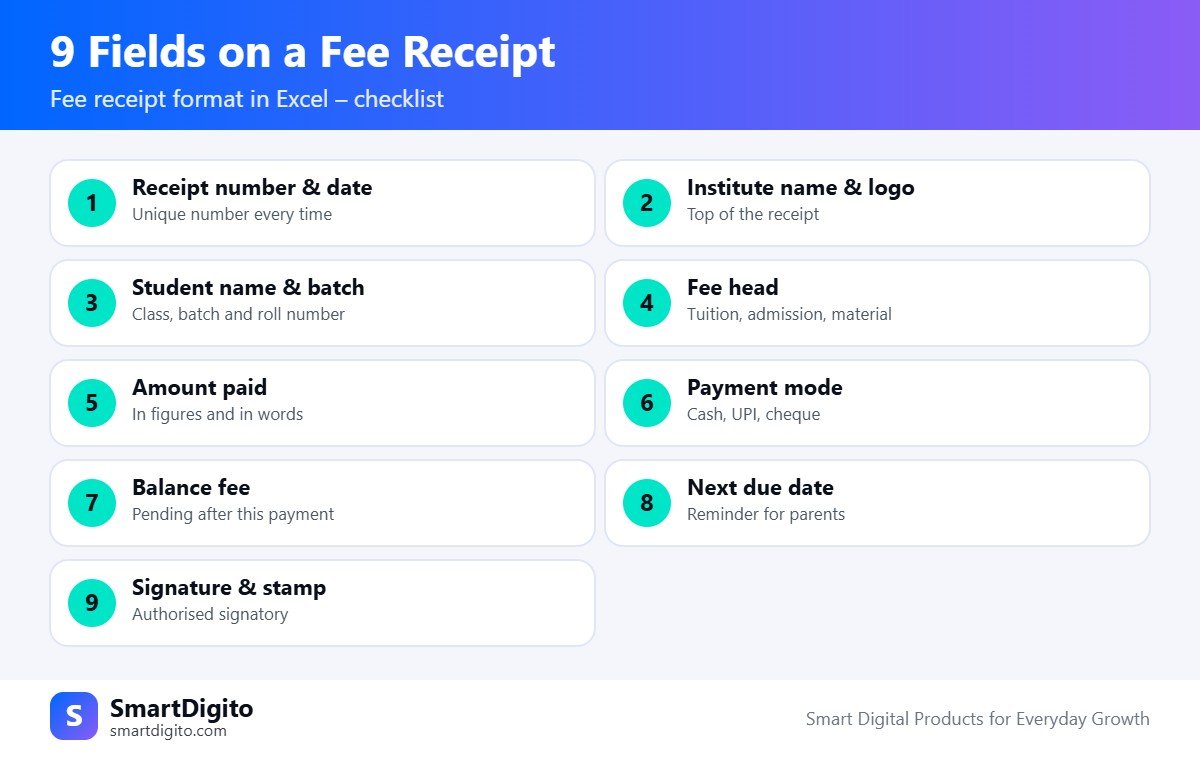
Every fee receipt format in Excel should show these nine items.
- Receipt number and date. A unique number for every receipt.
- Institute name and logo. Place them at the top.
- Student name and batch. Add class, batch and roll number.
- Fee head. Tuition, admission, study material or exam fee.
- Amount paid. Write it in figures and in words.
- Payment mode. Cash, UPI, bank transfer or cheque.
- Balance fee. The amount still pending after this payment.
- Next due date. This helps parents plan the next payment.
- Signature and stamp. The authorised person signs.
How to Set Up Your Fee Register
Keep the data and the printable receipt on different sheets. This makes your fee receipt format in Excel easy to update and easy to print.
- Students sheet: student ID, name, batch, parent mobile and total fee.
- Payments sheet: receipt number, date, student ID, amount, mode and fee head.
- Receipt sheet: pick a receipt number from a dropdown and the receipt fills itself.
Use data validation for the payment mode and the fee head, so spellings never change.
Excel Formulas for a Fee Receipt Format
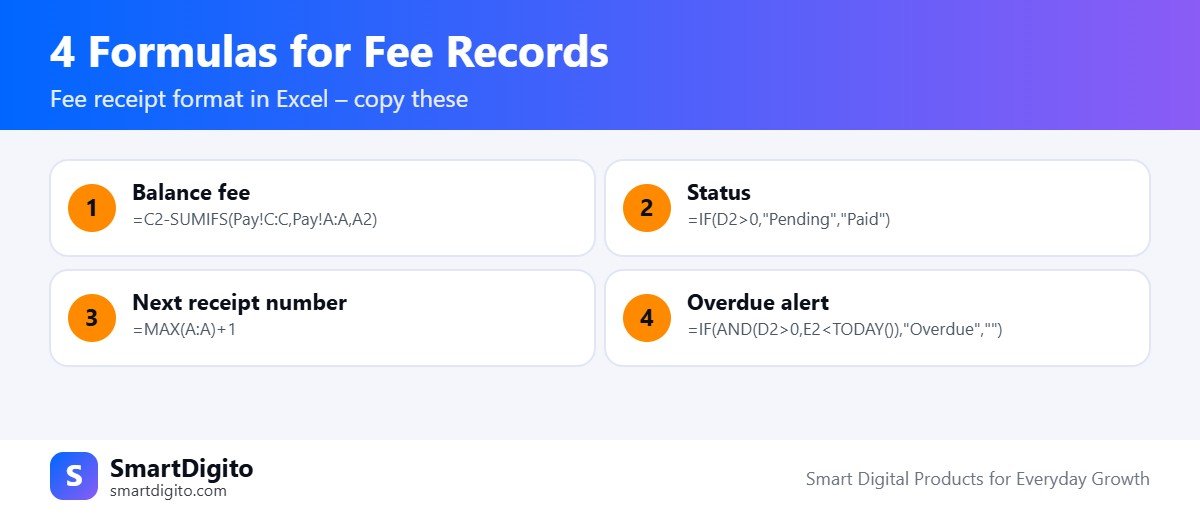
Assume the total fee is in column C of the Students sheet, and payments are in a sheet called Pay.
Balance fee for a student:
=C2-SUMIFS(Pay!C:C,Pay!A:A,A2)Status of the fee:
=IF(D2>0,"Pending","Paid")Next receipt number:
=MAX(A:A)+1Overdue alert, where column E holds the due date:
=IF(AND(D2>0,E2<TODAY()),"Overdue","")These four formulas turn a plain fee receipt format in Excel into a small fee manager. For help with other functions, see the Microsoft Excel help centre.
How to Number Your Fee Receipts
Good numbering keeps your fee receipt format in Excel trustworthy.
- Use one running series, for example FR-2026-001, FR-2026-002 and so on.
- Never reuse a number, even if a receipt is cancelled.
- Do not delete a wrong receipt. Mark it “Cancelled” and write the reason.
- Start a new series each academic year.
Fee Receipt Format in Excel for Classes and Schools
The fee receipt format in Excel is almost the same for all institutes, but small details change.
Coaching Classes
Coaching classes often take fees in instalments. Add a column for the instalment number and one for the batch. Show the total fee, the amount paid so far and the balance on every receipt.
Schools and Tuition Teachers
Schools usually collect fees term-wise or monthly. Add a column for the month or term. A tuition teacher with a few students can keep one simple sheet and a basic receipt.
UPI QR and WhatsApp Reminders
Many parents pay by UPI today. Add your UPI ID to the receipt sheet and show a QR for the balance amount, so parents can pay with one scan. Read about UPI on the NPCI website.
For reminders, prepare a short WhatsApp message with the student name, balance and due date. Always send it yourself, so your number stays safe and the message feels personal.
Sample Fee Receipt Layout
A simple fee receipt format in Excel fits on half of an A4 page. Here is a layout that works well for most institutes.
- Top band: logo on the left, institute name, address and phone in the centre.
- Title line: the word “Fee Receipt”, with the receipt number and date on the right.
- Student block: name, class or batch, roll number and parent name.
- Payment table: fee head, amount, payment mode and reference number.
- Summary: total fee, paid till date, this payment and balance.
- Footer: amount in words, next due date, signature and stamp.
Keep fonts clean and avoid heavy colours, so the receipt prints well on any printer.
Monthly Fee Routine for Institute Owners
Even the best fee receipt format in Excel needs a routine. A simple monthly habit keeps your numbers accurate.
- Daily: enter every payment on the same day and print or save the receipt.
- Weekly: filter the pending list and call or message the parents.
- Monthly: total the collection, compare it with the bank and UPI statements, and save a backup.
- Every year: start a new file and keep the old one safe as a record.
Tips to Protect Your Fee Records
Fee data is sensitive, so protect your fee receipt format in Excel from mistakes and misuse.
- Lock formula cells and allow editing only in the input cells.
- Keep the file in a folder with a password or on a trusted drive.
- Save a dated backup every week.
- Give staff only the access they need.
Common Fee Receipt Format Mistakes
- Skipping the receipt number or repeating it.
- Typing the balance by hand instead of using a formula.
- Not recording the payment mode.
- Forgetting to note the next due date.
- Keeping the file on one phone without a backup.
A Ready-Made Coaching Fee Manager
If you do not want to build all this yourself, the Coaching Institute Management Kit includes an Institute Manager workbook with students, fee payments, one-click fee receipts, pending fees and a dashboard. It also has attendance, test marks, a timetable, forms and WhatsApp templates.
For report cards, read our guide to the result card format in Excel.
Frequently Asked Questions
What should a fee receipt include?
It should include the receipt number, date, student details, fee head, amount paid, payment mode, balance, next due date and a signature.
Can I make a fee receipt in Excel for free?
Yes. Excel can store payments, calculate balances and print a clean receipt using the formulas in this guide.
How do I find students with pending fees?
Calculate the balance with SUMIFS, then filter the balance column for values above zero.
Should I keep a copy of every receipt?
Yes. Save a PDF or keep the payments sheet safe, so you can show proof when needed.
Final Thoughts
A good fee receipt format in Excel is simple: a unique number, clear amounts and an automatic balance. Set it up once, use it every day, and your fee records stay clean.
Note: This guide is general information and not accounting or tax advice.