
Modular Kitchen Quotation Format in Excel: 9 Easy Fields (Best Guide)
A clear modular kitchen quotation format in Excel helps interior designers and carpenters win more kitchen projects. When a client asks “How much for my kitchen?”, a neat, itemised quotation shows that you are professional and builds trust.
In this guide, you will learn the 9 must-have fields of a modular kitchen quotation format in Excel, four formulas for area and cost, and how to set a fair payment schedule.
Table of Contents
- Why Use a Modular Kitchen Quotation Format in Excel
- Modular Kitchen Quotation Format in Excel: 9 Must-Have Fields
- How to Set Up the Excel Sheets
- Excel Formulas for a Kitchen Quotation
- Per Sq Ft or Per Cabinet Pricing
- Hardware, Countertop and Appliances
- Payment Schedule and Terms
- Common Quotation Mistakes
- A Ready-Made Interior Designer Kit
- Frequently Asked Questions
Why Use a Modular Kitchen Quotation Format in Excel
A kitchen has many parts: base cabinets, wall cabinets, a tall unit, hardware and a countertop. A modular kitchen quotation format in Excel keeps all of them in one clear table.
- Clarity: the client sees what each part costs.
- Speed: formulas calculate area, cost and GST for you.
- Fewer disputes: size, material and finish are written down.
Modular Kitchen Quotation Format in Excel: 9 Must-Have Fields
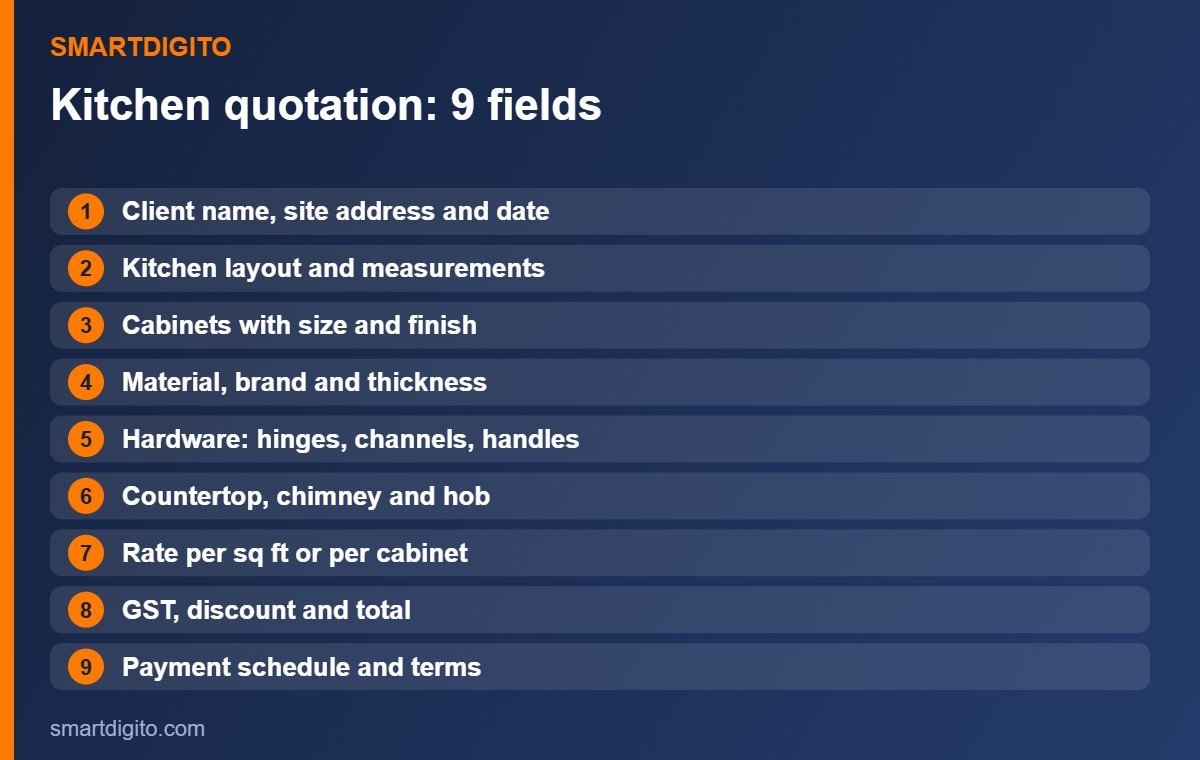
Every modular kitchen quotation format in Excel should show these nine items.
- Client and site details. Name, phone, site address and the date.
- Layout and measurements. L-shape, U-shape, parallel or straight, with wall sizes.
- Cabinet list. Each cabinet with width, height and depth.
- Material and finish. Plywood or board type, thickness, laminate or shutter finish.
- Hardware. Hinges, channels, handles, baskets and other fittings.
- Countertop and appliances. Counter material, sink, chimney and hob, if included.
- Rate and amount. Rate per sq ft or per cabinet, with the line total.
- GST, discount and total. Show the grand total clearly.
- Payment schedule and terms. Advance, stages, delivery time and warranty notes.
How to Set Up the Excel Sheets
Keep the rates and the quotation on separate sheets. This makes your modular kitchen quotation format in Excel easy to update.
- Rates sheet: material, finish, hardware items and their rates.
- Cabinets sheet: cabinet name, width, height, depth, quantity and finish.
- Quotation sheet: the client-facing page with a summary, totals and terms.
Use data validation for the finish and the material, so names stay the same every time.
Excel Formulas for a Kitchen Quotation
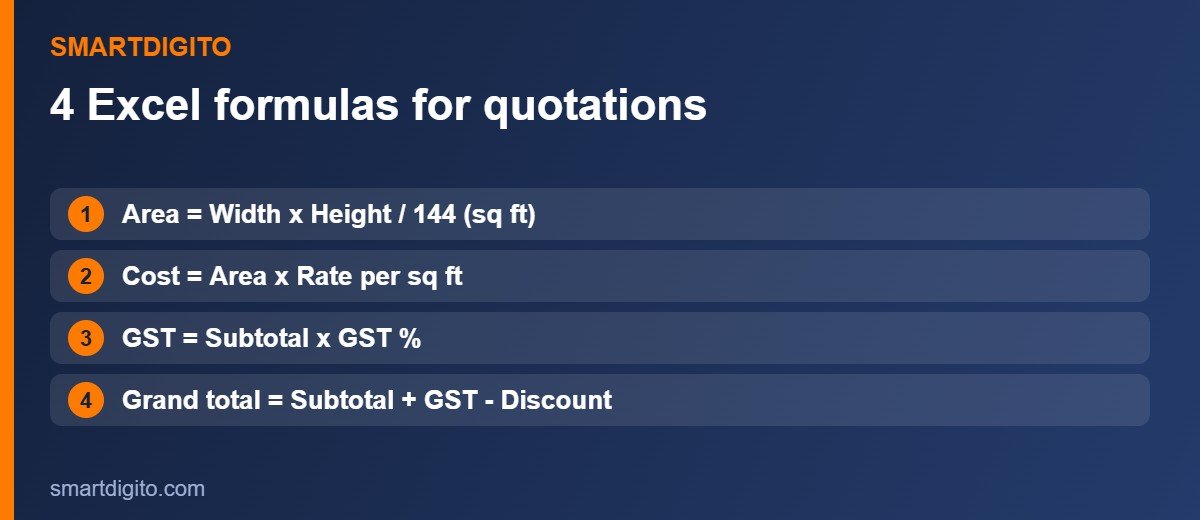
Assume width is in column B, height in column C (both in inches) and the rate per sq ft is in column E.
Area of a cabinet in sq ft:
=B2*C2/144Cost of a cabinet:
=D2*E2*F2Here D is the area and F is the quantity.
GST on the subtotal, where H1 holds the GST percent:
=ROUND(SUM(G2:G40)*H1/100,0)Grand total after discount:
=SUM(G2:G40)+I1-J1These four formulas turn a plain modular kitchen quotation format in Excel into a working estimator. For more help, see the Microsoft Excel help centre.
Per Sq Ft or Per Cabinet Pricing
There are two common ways to price a kitchen.
- Per sq ft: simple for the client, but make clear what the rate includes.
- Per cabinet: more detailed, and good when cabinets vary in size and finish.
Choose one method and use it on every quotation. Update your rates often, because material prices change.
Hardware, Countertop and Appliances
Many disputes start with hardware and extras. In your modular kitchen quotation format in Excel, list these items separately.
- Hinges, drawer channels, handles and baskets with brand and quantity.
- Countertop material and its size in running feet.
- Sink, tap, chimney and hob, and whether they are included or extra.
- Lights, backsplash and any civil work.
Payment Schedule and Terms
Write the payment plan on the quotation. A common plan is an advance on confirmation, a second payment when material arrives and the balance after installation.
- State the percent and the amount for each stage.
- Mention the delivery and installation time.
- Add notes on warranty, validity of the rate and what changes cost extra.
You can also read our guide to the general interior quotation format in Excel.
Common Modular Kitchen Quotation Mistakes
- Giving one lump-sum price without details.
- Not writing the material, thickness and finish.
- Forgetting hardware, countertop or appliances.
- Missing the payment schedule.
- Using old rates for a new quotation.
A Ready-Made Interior Designer Kit
If you do not want to build everything yourself, the Interior Designer Business Kit has an Excel estimator that creates the cut list, a material summary and a client quotation with GST, a payment schedule, UPI QR and a WhatsApp message. It also includes a plywood cutting optimizer, a project manager and client forms.
Frequently Asked Questions
What should a modular kitchen quotation include?
It should include client details, layout, cabinet sizes, material and finish, hardware, countertop, rates, GST, total and the payment schedule.
How do I calculate the cost of a kitchen cabinet?
Find the area in sq ft from width and height, then multiply by the rate and the quantity.
Is per sq ft pricing better?
It is simple, but per cabinet pricing is more detailed. Use the method that suits your work, and be clear about what is included.
Can I make a kitchen quotation in Excel for free?
Yes. Use a rates sheet, a cabinets sheet and a quotation sheet with the formulas in this guide.
Final Thoughts
A good modular kitchen quotation format in Excel is clear and complete: the nine fields, simple formulas and a fair payment plan. Build it once, reuse it for every kitchen and win clients with a professional quotation.
Note: This guide is general information and not accounting or tax advice.